Critical Path Method (CPM):
How to Plan, Schedule & Control Any Project
A complete engineer's guide to the Critical Path Method — covering network diagrams, Forward Pass, Backward Pass, Float calculation, path identification, project crashing, and practical applications for manufacturing and engineering programmes.
Contents
- What is the Critical Path Method?
- History — DuPont to PMBoK
- Network Diagrams & Activity Dependencies
- Forward Pass — Earliest Times
- Backward Pass — Latest Times
- Float / Slack — Total & Free
- Identifying the Critical Path
- Worked Example — Full Network
- Crashing the Critical Path
- CPM Tools, Limitations & CPM vs PERT
- Summary & Key Rules
What is the Critical Path Method?
Every project — whether it is launching a new vehicle component, constructing a factory extension, implementing an ERP system, or commissioning a new production line — is a network of interdependent tasks. Some tasks can be done in parallel. Others must wait for predecessors to finish before they can begin. The total project duration is not the sum of all task durations, nor is it just the longest single task. It is the longest sequence of dependent tasks from start to finish — and that sequence is the Critical Path.
The Critical Path Method (CPM) is a schedule network analysis technique used to estimate the minimum project duration and determine the amount of scheduling flexibility on the logical network paths within the schedule model. The critical path is the sequence of activities that represents the longest path through a project, which determines the shortest possible project duration.
The CPM was developed to answer two questions that project managers ask at the start of every project: What is the earliest this project can possibly finish? And which tasks are so critical that delaying any one of them delays the entire project? Any task on the critical path has zero scheduling flexibility — delay it by a day, and the project end date slips by a day. Tasks not on the critical path have float (also called slack) — they can be delayed without affecting the project end date, providing the PM with scheduling flexibility.
CPM is the single most important analytical tool in project scheduling. It tells the project manager not just what must be done, but what must be done on time — and gives them quantitative data to make intelligent trade-offs when the schedule is under pressure.
— Project Management Institute, PMBOK Guide 7th EditionHistory — From DuPont's Chemical Plants to the Global Standard
The Critical Path Method was developed simultaneously and independently in 1957 by two teams working on different problems. The first was a joint team from E.I. du Pont de Nemours and Company and Remington Rand, led by Morgan Walker and James Kelley Jr. — working on the problem of scheduling complex chemical plant construction and maintenance shutdowns. Their goal was to find the optimal schedule that minimised total project cost by identifying which activities were truly critical and which had scheduling flexibility. Their 1959 paper, "Critical Path Planning and Scheduling," described the mathematical foundation of CPM that is still used today.
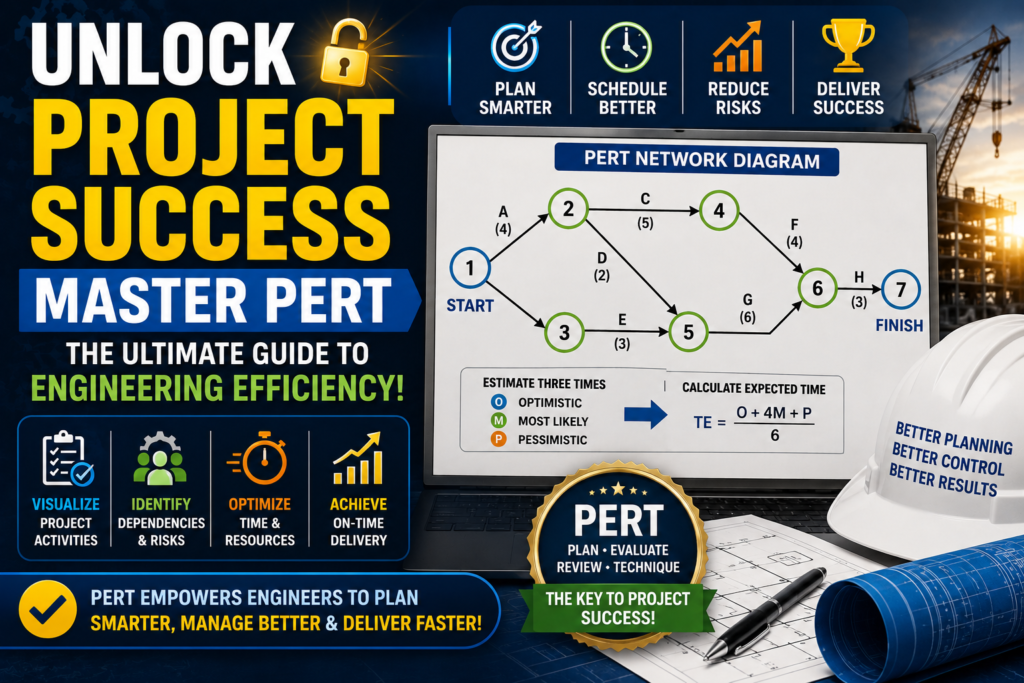
The second development came from the US Navy working on the Polaris ballistic missile programme — a programme of extraordinary complexity involving thousands of contractors and suppliers. The Navy, working with Booz Allen Hamilton and Lockheed, developed PERT (Programme Evaluation and Review Technique) in 1958. PERT addressed the same network analysis problem as CPM but added probabilistic time estimates (optimistic, most likely, pessimistic) to handle uncertainty — reflecting the reality that many Polaris activities had never been done before and their durations were genuinely unknown.
CPM and PERT spread rapidly through American industry in the 1960s and were adopted in construction, aerospace, defence, and infrastructure projects. They were incorporated into the first PMBOK Guide (PMI, 1987) and remain core competencies tested in the PMP (Project Management Professional) certification examination. Modern project management software — Microsoft Project, Oracle Primavera, ClickUp, and others — automates the CPM calculations, but the underlying mathematics and logic have not changed in 65 years. Understanding CPM at the mathematical level remains essential for any project manager who uses scheduling software, because the software produces outputs that only make sense if you understand how they were calculated.
Network Diagrams & Activity Dependencies
CPM is built on a network diagram — a graphical representation of all project activities and the logical dependencies between them. The network diagram makes visible what no Gantt chart or task list can show clearly: which activities are connected, which can run in parallel, and where sequences of dependent activities converge and diverge.
Precedence Diagramming Method (PDM) — Activity on Node
The modern standard for CPM network diagrams is the Precedence Diagramming Method (PDM), also called Activity on Node (AON). Each activity is represented by a rectangular node (box) that contains the activity information. Arrows connect nodes to show dependencies. The box conventionally shows six values around the activity name: Early Start (ES) and Early Finish (EF) in the top-left and top-right corners, Activity Name and Duration in the centre, and Late Start (LS) and Late Finish (LF) in the bottom-left and bottom-right corners. The Float is typically shown in a seventh position below.
The Four Types of Activity Dependencies
PDM supports four types of logical dependency between activities. Understanding these is essential for building an accurate network diagram:
| Dependency Type | Notation | Meaning | Example | Most Common? |
|---|---|---|---|---|
| Finish-to-Start (FS) | A→B (FS) | B cannot start until A is completely finished | Concrete must cure (A) before formwork removal (B) | Most Common |
| Start-to-Start (SS) | A→B (SS) | B cannot start until A has started | Training (B) can start after recruitment (A) begins | Common |
| Finish-to-Finish (FF) | A→B (FF) | B cannot finish until A has finished | Testing (B) cannot finish until debugging (A) finishes | Common |
| Start-to-Finish (SF) | A→B (SF) | B cannot finish until A has started | Old system (B) cannot be decommissioned until new system (A) goes live | Rare |
In the vast majority of manufacturing and engineering projects, almost all dependencies are Finish-to-Start. The other three types may appear in complex programmes, but FS dominates. Dependencies may also carry a lag (a mandatory waiting period between the predecessor's finish and the successor's start — for example, a concrete curing time of 7 days after pouring) or a lead (an overlap where the successor can start before the predecessor finishes).
Forward Pass — Calculating the Earliest Times
The Forward Pass is the first calculation in CPM. Starting at the project's beginning and working left to right (from the first activity to the last), it calculates the Earliest Start (ES) and Earliest Finish (EF) for every activity in the network. These values represent the earliest possible time each activity can start and finish, assuming all predecessor activities are completed as early as possible.
The Forward Pass answers: "If everything goes as fast as it possibly can from the very beginning, what is the earliest each activity can start and finish — and what is the earliest the project can be completed?"
Forward Pass — Step by Step
The project starts at time 0. If there are multiple activities at the start with no predecessors, each receives ES = 0. These are your parallel starting activities.
If Activity A has ES = 0 and Duration = 4 days, then EF = 0 + 4 = 4. The activity finishes at the end of Day 4.
If Activity B follows Activity A (FS dependency), then B's ES = A's EF = 4. Calculate B's EF = 4 + B's Duration.
If Activity E has two predecessors — Activity C (EF = 7) and Activity D (EF = 9) — then E's ES = MAX(7, 9) = 9. Activity E cannot start until BOTH C and D are finished, so you must wait for the later of the two.
Work forward through every activity in the network. The EF of the final activity (or the maximum EF of all final activities if there are multiple) gives the minimum project duration — the earliest the entire project can be completed.
Backward Pass — Calculating the Latest Times
Once the Forward Pass is complete, the Backward Pass begins. Starting at the project's end and working right to left, it calculates the Latest Finish (LF) and Latest Start (LS) for every activity — the latest possible time each activity can finish and start without delaying the project end date.
The Backward Pass answers: "What is the latest each activity can finish and start — while still meeting the project end date calculated in the Forward Pass?" Activities that have the same ES/EF and LS/LF values are on the critical path.
Backward Pass — Step by Step
The latest the project can finish is the earliest it can finish (from the Forward Pass). This is the critical constraint — the project end date. Assign this value as LF to the last activity (or all activities at the project end if there are multiple).
If the last Activity G has LF = 13 and Duration = 3 days, then LS = 13 − 3 = 10. The activity must start no later than Day 10 to finish by Day 13.
The predecessor of Activity G must finish no later than G's LS (Day 10). So the predecessor's LF = 10. Then calculate that predecessor's LS = LF − Duration.
If Activity B feeds both Activity C (LS = 6) and Activity D (LS = 4), then B's LF = MIN(6, 4) = 4. Activity B must finish by Day 4 so that Activity D — the earlier-starting successor — can begin on time.
If the Backward Pass is calculated correctly, the LS of every critical path activity should equal its ES, and the LF should equal the EF. If the first activity's LS ≠ its ES, there is a calculation error in the Backward Pass.
Float / Slack — Total Float and Free Float
Float (also called Slack) is the amount of time an activity can be delayed without affecting a specified milestone or project end date. It is calculated from the Forward and Backward Pass values and is the key metric that identifies the critical path. There are two important types of float that every project manager must understand:
Total Float vs Free Float — The Critical Difference
Total Float belongs to the network path, not to the individual activity. If three activities A, B, C are in a sequence with 5 days of total float, using 3 days of float on Activity A leaves only 2 days for Activities B and C combined. Consuming float on one activity reduces the float available to all downstream activities on the same path. This is why total float must be managed at the path level, not just the activity level.
Free Float belongs to the individual activity. An activity can use its free float without affecting any other activity — it is genuinely independent scheduling flexibility. Free float is always less than or equal to total float. On the critical path, both are zero.
| Float Type | Formula | Meaning | Managed At |
|---|---|---|---|
| Total Float | LS − ES = LF − EF | Max delay without affecting project end date | Path level — shared among path activities |
| Free Float | ES(next) − EF(current) | Max delay without affecting any successor's ES | Activity level — independent scheduling flexibility |
| Critical Path Float | 0 (always) | Any delay immediately delays the project | Must be protected absolutely — zero tolerance |
Near-Critical Activities
Activities with small positive float — typically 1–3 days on a multi-week project — are near-critical and deserve almost as much attention as critical activities. Float can be eroded by scope changes, unexpected delays, or resource conflicts, converting a near-critical activity into a critical one mid-project. Experienced project managers track both the critical path and all near-critical paths (typically defined as activities with float less than 10% of total project duration) and treat float consumption as an early warning indicator requiring proactive management.
Identifying the Critical Path
With Forward Pass, Backward Pass, and Float calculations complete, identifying the critical path is straightforward: the critical path consists of every activity in the network where Total Float = 0. These activities form the longest path through the project network — the path that determines the project's minimum duration.
An activity is on the critical path if and only if: (1) Total Float = 0, and (2) ES = LS (equivalently, EF = LF). Every project has at least one critical path. Complex projects may have two or more critical paths simultaneously — each with zero float — which is an extremely high-risk condition requiring immediate management attention.
Properties of the Critical Path
Several key properties of the critical path are non-obvious but critically important for project management decisions:
| Property | Explanation | Management Implication |
|---|---|---|
| Longest path = shortest duration | The critical path is the longest path, but it represents the minimum project duration — the shortest time the project can possibly be completed | The project cannot finish faster than the critical path allows, regardless of how much resource is added to non-critical tasks |
| Zero float = zero tolerance | Any delay to any critical activity delays the project end date by exactly the same amount | Critical activities must be monitored daily, not weekly — problems require same-day escalation |
| The path can shift | As the project executes, delays consume float on non-critical paths — a non-critical path can become critical mid-project | Re-run CPM calculations regularly (at least weekly on active projects) — the critical path at week 1 is not necessarily the critical path at week 8 |
| Multiple critical paths = maximum risk | Two simultaneous critical paths means the PM must protect two paths at once — there is no slack in the system anywhere | Reduce to one critical path where possible through crashing or resource reallocation — treat multiple critical paths as a risk event |
| Adding resources to non-critical tasks wastes money | Accelerating a non-critical task has zero effect on the project end date — it only consumes budget | When the schedule is under pressure, invest resources on critical path activities only, never on non-critical ones |
Worked Example — Complete CPM Calculation
The following worked example covers a simple manufacturing project: installing and commissioning a new CNC machining cell. There are 8 activities with defined durations and dependencies. We will complete the full Forward Pass, Backward Pass, Float calculation, and critical path identification step by step.
Step 1 — Activity List with Durations and Dependencies
| Activity | Description | Duration (Days) | Predecessors |
|---|---|---|---|
| A | Site Preparation & Civil Works | 5 | None (Start) |
| B | Electrical Installation | 4 | A |
| C | Machine Procurement & Delivery | 8 | None (Start) |
| D | Machine Installation & Alignment | 3 | B, C |
| E | Control Software Configuration | 2 | D |
| F | Tooling Setup & Tool Offsets | 2 | D |
| G | Test Runs & Process Validation | 3 | E, F |
| H | Operator Training & Sign-Off | 2 | G |
Step 2 — Forward Pass Calculation
| Activity | Duration | Predecessors | ES Calculation | ES | EF = ES + D |
|---|---|---|---|---|---|
| A | 5 | None | Project start = 0 | 0 | 5 |
| C | 8 | None | Project start = 0 | 0 | 8 |
| B | 4 | A | EF(A) = 5 | 5 | 9 |
| D | 3 | B, C (merge) | MAX(EF(B), EF(C)) = MAX(9, 8) = 9 | 9 | 12 |
| E | 2 | D | EF(D) = 12 | 12 | 14 |
| F | 2 | D | EF(D) = 12 | 12 | 14 |
| G | 3 | E, F (merge) | MAX(EF(E), EF(F)) = MAX(14, 14) = 14 | 14 | 17 |
| H | 2 | G | EF(G) = 17 | 17 | 19 |
Project Duration (from Forward Pass) = 19 days. This is the earliest the project can be completed, assuming all activities run as early as possible.
Step 3 — Backward Pass Calculation
| Activity | Duration | LF Calculation | LF | LS = LF − D |
|---|---|---|---|---|
| H | 2 | Project end = 19 (= EF of H) | 19 | 17 |
| G | 3 | LS(H) = 17 | 17 | 14 |
| E | 2 | LS(G) = 14 | 14 | 12 |
| F | 2 | LS(G) = 14 | 14 | 12 |
| D | 3 | MIN(LS(E), LS(F)) = MIN(12, 12) = 12 | 12 | 9 |
| B | 4 | LS(D) = 9 | 9 | 5 |
| C | 8 | LS(D) = 9 | 9 | 1 |
| A | 5 | LS(B) = 5 | 5 | 0 |
Step 4 — Float Calculation and Critical Path
| Activity | ES | EF | LS | LF | Total Float = LS − ES | Critical? |
|---|---|---|---|---|---|---|
| A | 0 | 5 | 0 | 5 | 0 | YES — Zero Float |
| C | 0 | 8 | 1 | 9 | 1 | Near-Critical (1 day float) |
| B | 5 | 9 | 5 | 9 | 0 | YES — Zero Float |
| D | 9 | 12 | 9 | 12 | 0 | YES — Zero Float |
| E | 12 | 14 | 12 | 14 | 0 | YES — Zero Float |
| F | 12 | 14 | 12 | 14 | 0 | YES — Zero Float |
| G | 14 | 17 | 14 | 17 | 0 | YES — Zero Float |
| H | 17 | 19 | 17 | 19 | 0 | YES — Zero Float |
Critical Path: A → B → D → E → G → H and A → B → D → F → G → H (both paths through D are critical because E and F have the same duration and both converge on G). Project Duration = 19 days. Activity C (Procurement) has 1 day of float — it can start 1 day late without delaying the project. Note: A and B are also on the critical path even though they don't feed the longest individual chain, because the merge at D creates a convergence that makes multiple paths critical simultaneously.
Crashing the Critical Path
When the calculated project duration is longer than the required completion date, the project manager must "crash" the schedule — deliberately reducing the duration of selected critical path activities by adding resources (labour, equipment, parallel work shifts) at additional cost. Crashing is a rational, systematic cost-time trade-off analysis, not random acceleration.
Only crashing critical path activities reduces the project duration. Crashing a non-critical activity wastes money — it reduces that activity's duration but has zero effect on the project end date. Always crash the critical path activity with the lowest cost per day of duration reduction first — this minimises the total crashing cost.
Crashing Procedure — Step by Step
From the CPM network: current project duration = 19 days; required completion = 17 days; need to reduce by 2 days. Only activities on the critical path (A, B, D, E, F, G, H) are candidates for crashing.
For each critical path activity, estimate: (a) the maximum duration reduction achievable (crash limit), and (b) the additional cost per day of reduction (crash cost). Activities that cannot be shortened (regulatory approvals, curing times) have no crash option.
Select the critical path activity with the lowest incremental crash cost per day and reduce its duration by 1 day. Recalculate the CPM network to verify the critical path has not changed (crashing may cause a new critical path to emerge). Continue until the required reduction is achieved.
As you crash the critical path, the float on parallel paths is consumed. When a parallel path's float reaches zero, it becomes a second critical path. You must now crash both critical paths simultaneously to reduce the project duration further — which doubles (or more) the crash cost per day.
| Activity | Normal Duration | Crash Limit (min) | Max Reduction | Crash Cost / Day | Crash Option? |
|---|---|---|---|---|---|
| A — Site Prep | 5 days | 4 days | 1 day | ₹15,000 | Yes |
| B — Electrical | 4 days | 3 days | 1 day | ₹22,000 | Yes |
| D — Machine Install | 3 days | 2 days | 1 day | ₹18,000 | Yes |
| E — Software Config | 2 days | 1 day | 1 day | ₹8,000 | Cheapest ✓ |
| F — Tool Setup | 2 days | 1 day | 1 day | ₹8,000 | Equal cheapest ✓ |
| G — Test & Validate | 3 days | 2 days | 1 day | ₹25,000 | Yes |
| H — Training | 2 days | 2 days | 0 days | N/A | Cannot crash |
Crashing Decision: To reduce from 19 to 17 days, crash Activity E by 1 day (₹8,000) and Activity F by 1 day (₹8,000). Total crashing cost = ₹16,000. This is the minimum cost to achieve the 2-day reduction. Note: since E and F are both on the parallel sub-paths through D and G, crashing both is necessary because both reach G — if you crash only E without F, the path through F becomes the new bottleneck to G.
CPM Tools, Limitations & CPM vs PERT
CPM vs PERT — The Key Differences
| Aspect | CPM | PERT |
|---|---|---|
| Duration Estimates | Single deterministic estimate per activity | Three estimates: Optimistic (O), Most Likely (M), Pessimistic (P) |
| Expected Duration | Given directly | Calculated: Expected Time = (O + 4M + P) / 6 |
| Focus | Time–cost trade-off (crashing) | Time uncertainty and risk analysis |
| Best For | Repetitive projects with known durations | Research, development, first-of-kind projects where durations are uncertain |
| Industry Use | Construction, manufacturing, engineering | R&D, defence, pharmaceutical development |
| Output | Minimum project duration, float, critical path | Probability of completion by a given date |
CPM vs Gantt Chart
A Gantt Chart shows when activities occur on a timeline (time vs. task bars) but does not explicitly show dependencies between activities or identify the critical path. A CPM network diagram explicitly shows dependencies and calculates the critical path but is harder to communicate to non-technical stakeholders. Modern project management tools combine both: the CPM algorithm runs behind the scenes to calculate the critical path, which is then highlighted on the Gantt chart (typically in red). This combination — CPM logic with Gantt visualisation — is the standard approach in Microsoft Project, Primavera P6, and most professional PM tools.
CPM Software Tools
Microsoft Project
Industry standard. Auto-calculates CPM, highlights critical path in red, supports resource levelling and crashing analysis. Integrates with Microsoft 365.
Oracle Primavera P6
Enterprise standard for mega-projects. Most powerful CPM engine — handles 100,000+ activity networks with complex resource pools and multiple calendars.
ClickUp
Modern all-in-one tool with Gantt timeline view and critical path highlighting. Excellent for SME manufacturing projects. Free tier available.
Monday.com
Visual project management with Timeline (Gantt) view. Critical path visible with dependency arrows. Strong for cross-functional NPI teams.
Smartsheet
Spreadsheet-based PM tool with Gantt and critical path support. Familiar interface for engineers comfortable with Excel-style data entry.
Manual (Excel)
For learning and small projects, a structured Excel workbook with Forward/Backward Pass tables is entirely adequate and teaches the underlying logic far better than any software.
Limitations of CPM
What CPM Does Well
- Identifies the minimum project duration from a given set of activity estimates
- Quantifies scheduling flexibility (float) for every activity
- Provides a rational basis for schedule compression (crashing) decisions
- Enables focused management attention on critical activities
- Supports what-if analysis: if Activity X takes 2 extra days, which path becomes critical?
- Universally understood and supported by all PM software tools
CPM Limitations
- Assumes deterministic durations — does not handle uncertainty (use PERT for probabilistic analysis)
- Does not account for resource constraints — an activity may be critical because its assigned resource is overloaded, not because of logical dependency
- Network diagram can become extremely complex on large programmes with thousands of activities
- Garbage in, garbage out — inaccurate duration estimates produce a mathematically correct but practically useless critical path
- Static analysis — the critical path can change as the project executes; CPM must be recalculated regularly
- Does not model risk — an activity may have zero float but very low probability of delay; a near-critical activity may have high risk of delay
Summary & Key Rules
The Critical Path Method is 65 years old and remains indispensable. Every professional PM certification tests it. Every enterprise PM software tool implements it. Every construction, engineering, and manufacturing project of any complexity depends on it. Understanding CPM is not optional for engineers and project managers who manage time-critical programmes — it is the fundamental analytical skill that makes everything else in schedule management work.
The Critical Path Method — Seven Rules Every PM Must Know
1. The critical path is the longest path, not the most important one. Importance is a judgement call. The critical path is a mathematical fact — the longest sequence of dependent activities from project start to end.
2. Zero float = zero tolerance. Any delay to any critical activity delays the project by exactly the same amount. Critical activities must be monitored daily — not weekly.
3. Float belongs to the path, not the activity. Consuming float on one activity reduces it for all downstream activities on the same path. Manage total float at path level.
4. At merge points, take the Maximum EF (Forward Pass). At burst points, take the Minimum LS (Backward Pass). These are the two rules that most students get wrong. Write them on your desk.
5. Only crashing critical path activities reduces the project duration. Adding resource to a non-critical activity wastes money. Find the critical path first — then make resourcing decisions.
6. The critical path changes as the project executes. Re-run CPM weekly on active projects. The path identified in week 1 is not necessarily the path in week 6.
7. Multiple critical paths = maximum risk. Two simultaneous critical paths means the project has zero scheduling flexibility anywhere — treat this as a risk event and act immediately to restore float on at least one path.
Total Float = LS − ES = LF − EF. If this equals zero, you are on the critical path and every single day counts. If it is positive, you have room to manoeuvre — but do not spend that float without knowing which other activities share it. If it is negative, you already have a problem that needs to be resolved before the project even begins.